Ransomware Preparedness: The Importance of Cloud Backup and Disaster Recovery Planning
Ransomware attacks are wreaking havoc on Malaysian businesses, causing irreparable damage to their reputation, finances, and operations. In today’s digital age, where cybercriminals are becoming increasingly sophisticated, the importance of having a backup and disaster recovery plan cannot be overstated.
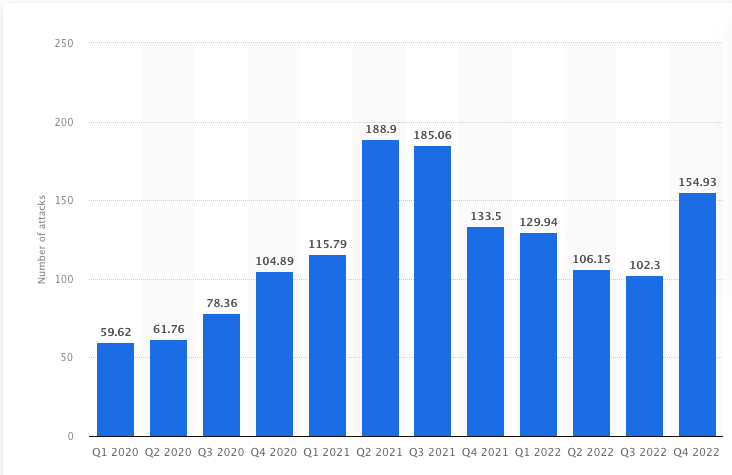
Number of ransomware attacks in 2020 – 2022
Imagine waking up one day to find that your entire business is paralyzed by a ransomware attack. All your critical data is encrypted, and you are forced to pay a hefty ransom to retrieve it or risk losing it forever. This nightmare scenario has become a reality for many Malaysian businesses, and the consequences are dire.
Without a robust backup and disaster recovery plan in place, businesses are vulnerable to losing their data and compromising their operations. This can lead to significant financial losses, damage to their reputation, and loss of customer trust.
What is Ransomware?
Ransomware is like a digital kidnapping that can bring businesses to their knees. Cybercriminals use this malicious software to lock away important data or even control entire computer systems, threatening to keep them locked unless a hefty ransom is paid. In a world where businesses increasingly rely on technology, the impact of ransomware attacks can be devastating.
Common types of ransomware attacks
- Encryption ransomware: Locks up files with encryption and demands payment to unlock them. Examples include WannaCry and Petya.
- Screen lockers:
- Locks the entire device and demands payment to unlock it. Examples include the FBI virus and Ukash.
- Screen locker ransomware prevents the victim from accessing their device by displaying a full-screen message that claims to be from law enforcement or government agencies.
- Doxware: Threatens to publish sensitive data unless payment is made. Examples include Shade and RansomWeb.
- Mobile ransomware: Mobile ransomware attacks target mobile devices, such as smartphones and tablets, and often use social engineering tactics to trick victims into downloading the malware. Once installed, the ransomware may lock the device or threaten to publish personal information.
Causes of Ransomware:
- Phishing emails and social engineering attacks: Victims may receive an email that looks like it’s from a legitimate company, asking them to click on a link to view an invoice. Once clicked, the ransomware is downloaded onto their computer.
- Exploiting security weaknesses in software: Hackers exploit to gain access to a victim’s system and install ransomware. This can be achieved by targeting known vulnerabilities in specific software versions.
- Stolen login credentials: Hackers use stolen login credentials to install ransomware on a victim’s device. They may achieve this by using tactics like phishing emails, where the victim enters their login information on a fake website.
- Trojan malware: Often disguised as a genuine program and when installed by the victim, allows the attacker to access the system and install the ransomware.
- Drive-by downloads: Hackers infect a legitimate website with ransomware, causing visitors to unknowingly download the malware onto their devices.
Recent Ransomware Attacks 2023
- Hospital Clinic de Barcelona
One of the main hospitals in the city suffered a ransomware attack that crippled its computer system, causing 3000 patient checkups and 150 non-urgent operations to be canceled. This incident occurred in March 2023.
This ransomware affects business operations which are critical to ongoing operations. - U.S. Marshals Service
U.S. Marshals Service suffered a security breach leading to sensitive information being compromised which contains information such as returns from legal processes, administrative information, and PII of subjects of USMS investigations, employees, and third parties. Company announced that the incident is significant, which affects law enforcement. - Reddit
Back in February 2023, the social news aggregation platform Reddit suffered a security breach in which attackers obtained unauthorized access to corporate documents, code, and some systems. The BlackCat ransomware gang, also known as ALPHV, claims to have stolen 80GB of data from Reddit during the attack and asks for a $4.5 million ransom. - Dole Food Company
One of the world’s largest suppliers of fresh fruit and vegetables, has disclosed that it has been affected by a ransomware attack that disrupted its operations. The food giant has hired third-party experts to assist with the mitigation and protection of the impacted systems and the incidents have also been reported to law enforcement.
You might be wondering how would you like to have peace of mind knowing that your business’s data is always protected from security breaches, system failures, natural disasters, and even ransomware attacks?
Cloud backup and disaster recovery is a vital defense against ransomware attack. With the power of cloud backup and disaster recovery, you can rest assured that your data is safe and easily recoverable in the event of any unexpected event.
Read on to learn more about the benefits of cloud backup & disaster recovery and how it can save your business from potential disasters.
What is Cloud Backup?
Cloud backup a.k.a Backup as a Service (BaaS) involves creating a duplicate copy of your business’s files, applications, and database and storing it in a different location that is not on your premises.
With cloud backup, organizations can securely store redundant copies of their data in remote servers or the cloud. This approach helps protect against data loss due to hardware failures, human errors, cyber threats, or other unexpected incidents. Cloud backup typically offers features such as automated backups, versioning capabilities, and the ability to restore data from different points in time. It provides an efficient and scalable way to ensure data availability and recovery, offering organizations peace of mind knowing their valuable data is securely backed up and easily recoverable when needed
What is Disaster Recovery?
Disaster recovery a.k.a Disaster Recovery as a Service (DRaaS) is a cloud-based solution that helps organizations ensure business continuity and data availability in the event of a disaster. With DRaaS, critical data, applications, and infrastructure components are replicated to an off-site location or a different data center. This replication allows for rapid recovery and restoration of the entire IT systems in case of a disaster, such as natural calamities, hardware failures, or cyber attacks. DRaaS offers scalability, flexibility, and cost-effectiveness by leveraging cloud resources and providing organizations with the ability to quickly resume operations and minimize downtime during disruptive events.
Cloud Backup or Disaster Recovery, Which One is For Your Business??
While cloud backup offers advantages, relying solely on cloud backup may be insufficient for a robust data protection strategy. It has limitations in terms of recovery time, dependence on internet connectivity, and the potential for a single point of failure. Security concerns and the lack of comprehensive disaster recovery capabilities further highlight its limitations. To address these, organizations often combine cloud backup with other solutions like DRaaS and backup appliances to ensure faster recovery, greater control, and a more comprehensive data protection approach.
When choosing between BaaS and DRaaS, it’s important to consider what you need protection from. BaaS is a suitable option for long-term cloud data storage and recovery, while DRaaS is best for quickly recovering the entire VM and a smaller amount of data in the event of a disaster.
If your business data is non-critical, able to afford and tolerate some downtime during disaster strikes, cloud backup will be the right choice. On the other hand, if your business relies on critical applications with minimal tolerance for downtime, disaster recovery (DRaaS) is the ideal solution. Understanding your recovery objectives, data protection needs and budgetary considerations will help you make informed decisions and ensure the continuity of your business operations in the face of unexpected events.
Read more here: Backup and Disaster Recovery Service Provider in Malaysia – IP ServerOne
Let’s dive into IP ServerOne’s Cloud backup and Disaster recovery.
As the adage goes, prevention is better than cure. To secure your business from ransomware threats, it is advisable to opt for protection that delivers reliable and frequent backups.
IP ServerOne’s cloud backup solution in Malaysia, powered by Veeam, provides comprehensive backup support for applications, files, and virtual or physical servers, delivering an effective disaster recovery solution.
Here are some key features of IP ServerOne’s Cloud Backup.
- Efficient Data Duplication and Compression: Our advanced data deduplication and compression techniques are here to save the day! By reducing storage requirements and optimizing backup performance, this feature not only cuts down on storage costs but also maximizes overall efficiency.
- Flexible Backup Scheduling and Retention Policies: Stay goodbye to rigid backup schedules! With our flexible backup scheduling and retention policies, users can now personalize their backup strategy to suit their specific needs. Strike the perfect balance between data protection and storage usage effortlessly.
- Instant VM Recovery : Our instant VM recovery feature allows users to quickly restore virtual machines (VMs) directly from the backup repository. Minimal downtime ensures smooth business continuity.
- Precise File-Level Recovery: Losing a file doesn’t have to be a nightmare. With our file-level recovery, you can effortlessly restore individual files or folders from backup images without resorting to a full VM recovery. It’s all about convenience and flexibility!
- Secure Off-Site Storage and Replication: We ensure your business data redundancy and protection against localized disaster or site failures. By replicating backup to an off-site location, your organizations gains an extra layer of disaster recovery preparedness
Above all, our immutable backup feature guarantees that backup stays unchangeable and tamper-proof for a specific duration, providing an extra layer of data protection. It prevents any unauthorized alteration, deletion, or encryption of backups, which is crucial in safeguarding against ransomware attacks and accidental data loss. Moreover, it helps your organization remain compliant with regulatory requirements. With this top-notch feature, your data is in safe hands, no matter what challenges come your way,
Read more of our features here.
Key features of Disaster Recovery As A Service (DRaaS) by IP ServerOne Powered by VMware
- Replication and Recovery Point Objectives (RPOs): The DRaaS solutions offer replication capabilities that enable continuous or periodic replication of critical data and virtual machines (VMs) to a secondary site or the cloud. This allows organizations to define RPOs that determine how much data can be lost in the event of a disaster.
- Failover and Failback Automation: The DRaaS solutions automate the failover and failback processes, making disaster recovery operations more efficient and reliable. Automated failover ensures that critical applications and VMs can quickly be brought online at the recovery site, while failback enables smooth transition back to the primary site once it’s restored.
- Integration with VMware vSphere and vCloud Suite: The DRaaS solutions seamlessly integrate with VMware’s virtualization platforms such as vSphere, vCloud Suite. This provides organizations with a unified management interface, streamlined deployment, and comprehensive support for disaster recovery in their virtualized environments.
- Application Consistency and Point-in-Time Recovery: The DRaaS solutions often provide application-consistent replication and recovery capabilities. This ensures that critical applications, such as databases or transactional systems, are replicated and recovered in a consistent state. Point-in-time recovery options allow organizations to restore applications and data to specific recovery points, minimizing data loss and maintaining data integrity.
- Scalability & Cost Effectiveness: Our DRaaS eliminates the need for dedicated hardware while ensuring scalability and elasticity. By leveraging virtualization and cloud tech, disaster recovery becomes easier without on-premise hardware. You can scale up or down as needed, using existing infrastructure and cloud resources, resulting in cost savings and efficient protection for specific applications or workloads. With our DRaaS, your organization is well prepared for any unforeseen events, without unnecessary complexities.
Read more of our DRaaS features, here.
By combining cloud backup with DRaaS, you’ll get comprehensive data protection, minimal downtime and quick recovery & response time. It’s the ultimate safeguard against data loss and operational disruptions, ensuring your business stays on track no matter what happens.
Key features of Disaster Recovery As A Service (DRaaS) by IP ServerOne Powered by VMware
- Replication and Recovery Point Objectives (RPOs): The DRaaS solutions offer replication capabilities that enable continuous or periodic replication of critical data and virtual machines (VMs) to a secondary site or the cloud. This allows organizations to define RPOs that determine how much data can be lost in the event of a disaster.
- Failover and Failback Automation: The DRaaS solutions automate the failover and failback processes, making disaster recovery operations more efficient and reliable. Automated failover ensures that critical applications and VMs can quickly be brought online at the recovery site, while failback enables smooth transition back to the primary site once it’s restored.
- Integration with VMware vSphere and vCloud Suite: The DRaaS solutions seamlessly integrate with VMware’s virtualization platforms such as vSphere, vCloud Suite. This provides organizations with a unified management interface, streamlined deployment, and comprehensive support for disaster recovery in their virtualized environments.
- Application Consistency and Point-in-Time Recovery: The DRaaS solutions often provide application-consistent replication and recovery capabilities. This ensures that critical applications, such as databases or transactional systems, are replicated and recovered in a consistent state. Point-in-time recovery options allow organizations to restore applications and data to specific recovery points, minimizing data loss and maintaining data integrity.
- Scalability & Cost Effectiveness: Our DRaaS eliminates the need for dedicated hardware while ensuring scalability and elasticity. By leveraging virtualization and cloud tech, disaster recovery becomes easier without on-premise hardware. You can scale up or down as needed, using existing infrastructure and cloud resources, resulting in cost savings and efficient protection for specific applications or workloads. With our DRaaS, your organization is well prepared for any unforeseen events, without unnecessary complexities.
Read more of our DRaaS features, here.
By combining cloud backup with DRaaS, you’ll get comprehensive data protection, minimal downtime and quick recovery & response time. It’s the ultimate safeguard against data loss and operational disruptions, ensuring your business stays on track no matter what happens.
Beyond a Ransomware Protection
Experience unrivaled data protection and peace of mind with IP ServerOne’s Cloud backup and DRaaS solutions! You can:
- Say goodbye to ransomware worries as we provide robust protection and ensure your valuable data is safe from cyber threats.
- Slash your organization’s costs with our cost-effective pay-per-use subscription model, eliminating the need for hardware and upfront investments.
- Have a good night rest knowing our dedicated team of backup and recovery experts works tirelessly around the clock, ensuring a well-maintained infrastructure with top-notch security measures.
- Tailor your Cloud Backup and DRaaS solutions that perfectly match your business needs. Customize protection levels and recovery targets based on what your organization requires. Whether it’s the entire server, critical infrastructure, or specific data sets, we’ve got you covered. Experience swift recovery and seamless business continuity with our flexible and personalized approach.
Need better comparisons?
| Type of Recovery | Backup & Standard Recovery | Disaster Recovery |
| Key Function | Protects against data loss | • High Availability for mission-critical applications • Instant recovery after a disaster |
| Target Device | Servers, workstations, mobile devices | • Cloud-based Apps (e.g Microsoft 365, Google, Salesforce etc.) • Critical servers and virtual machines |
| Recovery Requirements | • Data loss avoidance • Ability to restore/access single files or emails – quickly | • Quickly failover critical workloads to an offsite environment • Fail-back to the primary site |
| Required Infrastructure | Secure local and off-site storage | • High-performance off-site storage • Compute and network resourcesDR orchestration software |
| Storage Type | Local and/or off-site cold storage | Offsite hot storage |
| Recovery Time Objective (RTO) | Slow (days/weeks) | Fast (minutes) |
| Usage Frequency | Often | Rarely |
| Ease of DR Testing | Complex | Easy |
Trust IP ServerOne to safeguard your data, keep your business running smoothly, and be your reliable partner in data protection and disaster recovery.
Contact us today!